case study
Expense Tracker API
Production REST backend on Azure
- Role
- Sole developer – API, database, deployment
- Hosting
- Azure App Service · managed PostgreSQL · Container Registry
- API
- 12 endpoints · JWT with refresh tokens · rate-limited sign-in
- Quality
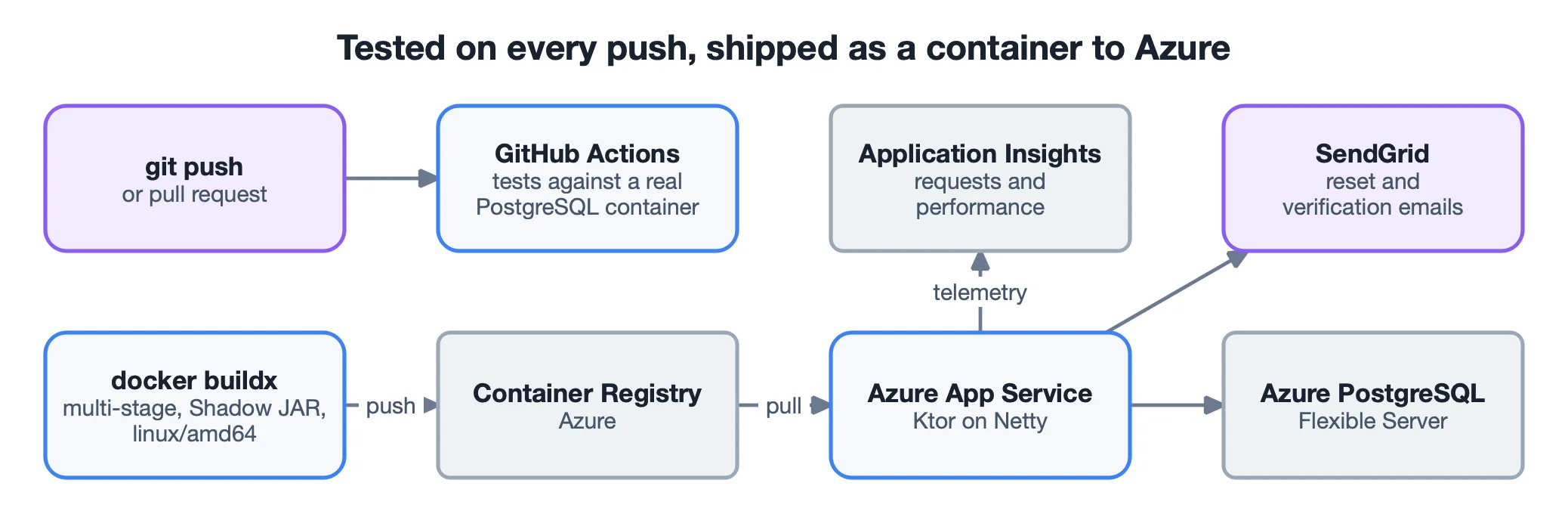
- Integration tests on a real PostgreSQL · GitHub Actions
- Kotlin
- Ktor
- PostgreSQL
- Docker
- Azure
- GitHub Actions
- JWT
The problem
It started as a way to learn backend development in Kotlin, and ended up touching every layer of a production-style API: routing, persistence, authentication, authorization, containers and a cloud deployment. The core rule: many users share one database, and each user can see and change only their own expenses.
What it does
- Expenses. Full CRUD over a real PostgreSQL database, through Exposed’s SQL DSL and a HikariCP connection pool.
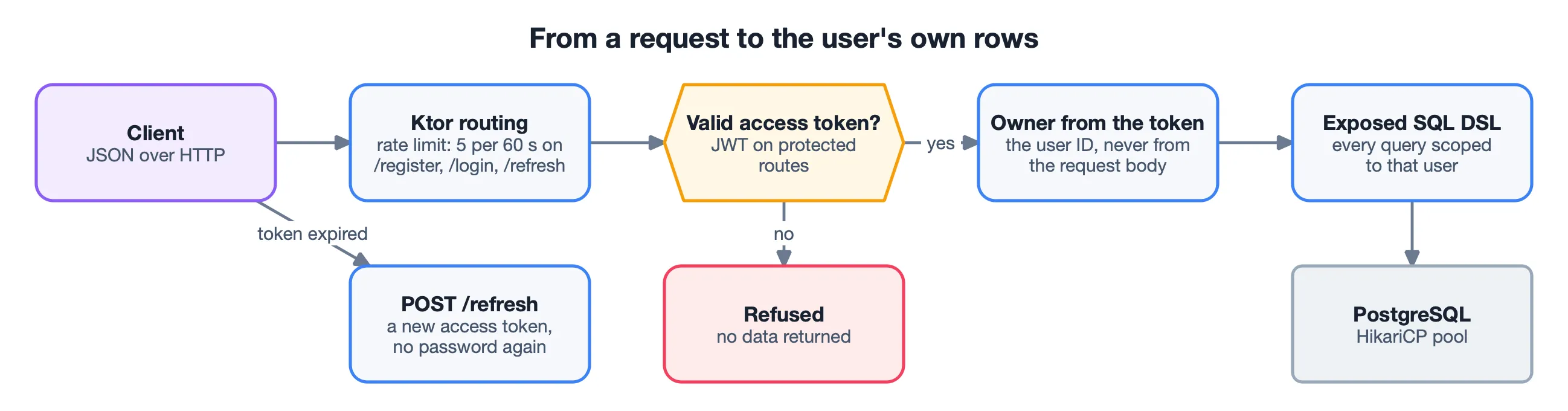
- Accounts. Registration with BCrypt-hashed passwords, and login that issues a short-lived access token and a longer-lived refresh token.
- Self-service email flows. Password reset and email verification through single-use, expiring tokens sent by SendGrid.
- Abuse limits.
/register,/loginand/refreshaccept 5 requests per 60 seconds per client.
Key decisions
Identity comes from the token, never from the request. Protected routes take the user ID from the verified JWT and scope every query to it. Nothing the client sends can widen that scope.
A reset endpoint that gives nothing away. /forgot-password returns the same answer
whether or not the account exists, so it cannot be used to find registered usernames. A
reset token is invalidated as soon as it is used, whatever the result.
Verification tracked, not enforced. A new user can log in before verifying the email;
the verified flag is kept on the user, so actions can be limited to verified users
later without locking anyone out now.
Tests against the real engine. The integration tests run against PostgreSQL in a CI service container instead of a mocked database – slower to set up, but they test what production runs.
Problems solved on the way
- The container skipped the database set-up. The Shadow JAR used Ktor’s
EngineMainas its entry point, which bypassed my ownmain()and itsDatabaseFactory.init(). Setting the manifest’sMain-Classexplicitly fixed it. - “localhost” inside a container. The hard-coded JDBC URL pointed at the container itself. All database settings moved to environment variables – the same code now runs locally, in Docker and on Azure.
- An architecture error reported as an authorization error. Azure said “check registry
credentials”, but the raw logs showed no
linux/amd64image: it had been built on Apple Silicon. Rebuilding withdocker buildx --platform linux/amd64fixed it. - Credentials silently ignored. A managed-identity flag left by the portal wizard made App Service skip the registry credentials. Recreating the service from a clean state with the Azure CLI removed the conflict.
- An email that “succeeded” but never arrived. A stray character in the SendGrid key caused a 401 that the deliberately uniform reset response hid; it showed only in the server log. A reminder that a successful call and the intended result are different claims.